
A software update will be released to SHIP and selected SRS environments
Please note: Some of the features outlined in these release notes depend on configuration options. If you identify a feature from these notes that interests you, but is not currently available in your configuration, please contact Infoxchange on 1300 366 516, (03) 9418 7487 or via email at [email protected]
Release v5.96 contains:
Features
- New Excel export engine – Available now alongside Classic export. Classic export retires 1 July 2027.
Some customers have seen Excel warn about, or refuse to open, reports exported from SRS. This is because the export uses an older file format that no longer meets Microsoft’s security standards. SRS 5.96 introduces a new export engine that creates trusted Excel files. It runs alongside the existing export, now called Classic export, so you have time to try it with your own reports before the switch.
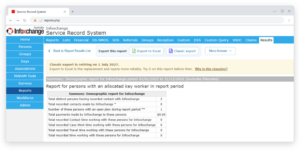
What you’ll see
-
- Export to Excel – The new engine. Downloads a standard Excel (.xlsx) file.
- Classic export – The export you know, available until 1 July 2027.
- A clearer screen – Export options are grouped together, with PDF, CSV and HTML downloads under More formats. Messages on the page tell you when your file is downloading or if something goes wrong.
Good to know
-
- Files may look a little different – Even if Classic export has worked well for you, you may notice small differences in the new Export to Excel file. Let us know if anything looks unusual.
- Very large reports – Some may not export with the new engine yet. If this happens, try a shorter date range or adjust your report settings.
- Try it now – Especially on your largest and most-used reports. If you need help, contact Infoxchange Support.
- Learn more – Exporting reports to Excel – SRS Help
- DSS
New DEX session details for CHSP – For sessions dated 1 July 2026 onwards, DSS sessions on CHSP service types now capture the extra details DEX requires. These include whether a subcontractor or volunteer delivered the session, where it took place, and meal details for meal delivery services. These details are included in the DSS data extract, so DEX accepts your sessions without you needing to correct them in the DEX portal.
Other Fixes and Improvements
- Report lists open in their own tab – Lists opened from Reports > Results now open in their own browser tab. The list is ready to view straight away instead of being rebuilt each time, so you can keep working in SRS while it’s open and print it without the on-screen buttons.
- MARAM Risk Assessments: previous assessment moved to prior records – When you create a new MARAM Child or Adult Risk Assessment by auto-populating from an earlier one, the earlier assessment now moves to prior records automatically, so only the current assessment stays active.
- Easier access to merged client records – opening a link to a client record that has been merged now takes the user to the combined record, instead of a “not found” page.
- Profile API: associated clients – The Profile API now returns associated clients even when the association doesn’t have an associated clients field configured.
System maintenance
- Resolved a number of application warnings and notices across notes, referrals, the support service form, SHS support periods and module configuration, and improved error logging for SMS sending, Telstra top-ups and BI reports so issues can be diagnosed faster.
- Prepared the database for the upcoming database platform migration. No intentional customer-visible changes.
- Ongoing maintenance to support the application framework and apply standard security patches, including upgrading frontend packages to address security vulnerabilities, moving to the current long-term-support version of Node, and blocking automated requests that probe for secret files before they reach the application.
Bug Fixes
API
Fixed the Notes API returning an empty value for select box and matrix fields.
Custom Query
Fixed Custom Query reports on MARAM Adult Risk Assessment so the Children and Other considerations questions show one column per answer again.
Documents
Fixed an issue where older attachments on person documents could not be deleted.
DSS
Fixed a DSS Case warning that could appear over an unrelated page and could not be closed without refreshing the browser.
MARAM
Fixed an issue where a Child Risk Assessment could not be shared with other workgroups in a cluster.
Fixed the list of previous assessments offered when auto-populating a MARAM Child Risk Assessment so it only shows assessments where you were the child, not the parent or guardian.
The same person can no longer be added twice to a new MARAM Child Risk Assessment, Adult Risk Assessment or Safety Plan.
Fixed an issue where section headers on the person details page changed to uppercase after creating a new MARAM tool.
Notifications
Fixed an issue where a mail server outage could make pages slow to load or time out.
Fixed an issue where exporting to PDF could fail when the page contained an image with a transparent background.
Person Restrictions
Fixed an issue where workers could be wrongly refused access to a client record, and where workers could be removed from a note when it was saved.
Person Search
Fixed an issue where clients with an apostrophe in their name could not be found by searching.
Plans
Fixed an issue where text entered into a goal’s additional fields on the Plans tab was not saved.
Referrals
Fixed an issue where a referral information pack SMS that could not be delivered was not recorded against the referral.
Fixed an issue where the Relink/Unlink base client button on referrals did not work when accessed from Person > Referrals tab.
Fixed an issue where some referral updates were not sent to external systems.
Client consent supplied on an incoming WA Housing Pathways referral is now retained on the referral record instead of being discarded.
Fixed an issue where a referral notification email was not sent if the sending service had no email address recorded.
Reports
Fixed an issue where exporting a saved report list to Excel failed.
Fixed an issue where downloading a very large report as HTML could fail with no explanation; a message now says the report is too large and to use the Excel export instead.
Exporting a large list report to Excel no longer fails partway through on very large reports.
Very wide list reports no longer fail to open on screen; the amount shown is now limited by report size rather than a fixed number of rows.
Fixed an issue where some batch reports failed to produce output on instances with a large number of note fields.
Single Sign On
Fixed an issue where tabs on the Admin page did nothing for some users who sign in with single sign-on.
Fixed the SSO setup screen showing a misleading success message when enabling SSO was blocked.
Fixed an issue where saving a change to a user’s name or other details could incorrectly show a Single Sign-On error, even when the email address was not being changed.
Turnaways
Fixed an error when exporting the Unassisted Persons list.